
Dynamic scene suggestions are personalized, AI-generated scene prompts, tasks, and rituals that adapt to your limits, kinks, and mood over time rather than repeating the same script twice. Done right, they run on explicit consent, a working safeword, and hard limits set before a single line of roleplay begins. The short answer: yes, an AI companion can build genuinely tailored femdom and BDSM scenes, but only when consent controls and human judgment stay in the driver’s seat. Templates and safety steps follow below.
TL;DR:
- AI-generated scene suggestions are highly personalized and adapt over time based on your preferences, limits, and compliance history.
- Proper onboarding and explicit safety measures, including hard limits, safewords, and mental state verification, are essential for safe AI-driven BDSM scenes.
- Starting with low-intensity prompts and gradually escalating helps identify AI misreads and prevents discomfort or safety risks during scenes.
- Privacy is protected through client-side encryption, with easy data export and deletion options, emphasizing user control over sensitive information.
- Mistrix provides built-in workflow features like graded compliance and memory pinning, making consent-first scene management accessible and streamlined.
Table of Contents
- How an AI Companion Creates Dynamic Scene Suggestions
- Consent, Safety, and Privacy Guardrails to Set First
- Prompt Templates for Building Dynamic Scenes
- Why Mistrix Is Built for Consent-First Scene Generation
- Sources
- FAQ
How an AI Companion Creates Dynamic Scene Suggestions
Good scene suggestions start with what you tell the AI before it ever proposes a task. Mistrix and similar platforms front-load this through onboarding rather than guessing at your preferences mid-conversation.
The inputs that shape everything downstream include:
- A level-assessment quiz that gauges your experience and comfort with intensity
- A fetish-interest map that flags what excites you and what to leave alone entirely
- Explicit hard limits, stated in plain language, not implied
- A working safeword the AI is built to recognize instantly
- Tone preferences, whether you want clinical precision, teasing warmth, or strict formality
Once those inputs exist, persistent memory changes the shape of the experience. An AI that remembers your last three sessions, your compliance patterns, and which rituals landed well can propose a scene that builds on history instead of starting cold each time. Graded compliance, where your responses earn a “pass,” “partial,” or adjusted mood and progression, gives the relationship a sense of continuity that a one-off chatbot exchange never achieves. This is the mechanism AI-driven BDSM companions use to function as rehearsal tools, letting you practice power-exchange language in a controlled setting before ever bringing it into a human dynamic.
The output itself takes several forms. Expect scripted scenes with dialogue cues, task lists with deadlines, recurring rituals like daily check-ins, scheduled accountability messages, and optional AI-generated images or video clips tagged to the scene’s agreed intensity. None of that replaces judgment, though. AI models can hallucinate, drifting toward content nobody asked for or escalating past a stated limit, which is why reporting on AI roleplay in kink communities consistently flags the need for human review at every stage.
Pro Tip: Start new scene types at low intensity for the first two or three exchanges. Watch how the AI interprets your limits before you let it escalate. This single habit catches misreads before they become uncomfortable.
Consent, Safety, and Privacy Guardrails to Set First
Every dynamic scene should pass through the same checks before it starts, not after something feels off. The National Coalition for Sexual Freedom’s guidance on responsible AI use in kink adapts a five-step Explicit Prior Permission model that works just as well for solo AI sessions as it does for in-person scenes:
- Agree on the specific acts and intensity level before the scene begins, not during it.
- Define what roleplay resistance is allowed to look like, so a scripted “no” doesn’t get confused with a real one.
- Set a safeword or stop command that halts everything immediately, no negotiation required.
- Confirm you’re of sound mind. AI sessions started while impaired remove your ability to actually consent.
- Rule out anything that risks serious physical or psychological injury, regardless of how the scene is framed.
Operationalizing the stop mechanic matters as much as agreeing to it. The most reliable systems pair semantic detection, where the AI notices distress language, with an explicit command word that triggers an immediate switch to aftercare mode. Relying on tone alone is not enough; you want a fixed word the AI can act on without interpretation.
Privacy deserves the same rigor. Favor platforms built on client-side encryption, where your PIN unlocks your data and the server itself cannot read it. Look for clear export and delete controls, since a platform that makes it hard to remove your history is not one built with your discretion in mind.
A few habits round out the practice: always read AI-generated output before acting on it, strip names and identifying details if you’re feeding in notes about a partner, keep a simple emergency plan for intense sessions, and build aftercare into the routine rather than treating it as optional. Roughly half of the caution voiced in current reporting on AI companions centers on governance gaps, not the technology itself. That’s a fixable problem, and it starts with the checklist above.
Prompt Templates for Building Dynamic Scenes
The quality of a suggestion depends almost entirely on the quality of your prompt. A pinned brief, meaning a saved block of context the AI references every session, produces far more consistent results than typing your preferences fresh each time.
A solid prompt structure looks like this:
- Context: who you are in this dynamic, and what mood you want tonight
- Role definitions: how the AI should behave and what persona to hold
- Hard limits: stated explicitly, every session, no assumptions
- Safeword: the exact word and what should happen the instant it’s used
- Desired intensity: soft, medium, or intense, named directly
- Aftercare instructions: what tone and pacing you want once the scene ends
- Memory pin: what should carry forward to the next session
From there, three scene templates cover most starting points:
- Soft: “You’re checking in on my discipline today. Ask about my progress on [task], respond with warmth if I’ve done well, and mild teasing correction if I haven’t. Keep intensity light and end with a short debrief.”
- Medium: “Assign me a task with a deadline and a consequence if I miss it. Frame the consequence as [specific, pre-agreed act]. Grade my compliance and let it affect your mood toward me next session.”
- Intense: “Run a structured scene around [named kink], staying strictly within [hard limits listed]. Use firmer language, but check in with a coded phrase like ‘status check’ partway through, and switch to aftercare the moment I say [safeword].”
Task and ritual templates work the same way: a daily check-in script, a reporting format where you log compliance, and a staged punishment ladder where intensity increases only after several logged successes. Ask the AI to grade each entry as pass, partial, or fail, and to let that grade nudge mood or progression rather than escalating blindly.
To automate the safety net, instruct the AI directly: “If I say [safeword], stop the scene immediately and switch to a calm, grounding aftercare script.” That one line, saved in your pinned brief, is worth more than any amount of mid-scene improvising.
Why Mistrix Is Built for Consent-First Scene Generation
Everything above describes a workflow. Mistrix is where that workflow already lives, built into the product rather than something you assemble yourself. Onboarding runs through the level-assessment quiz and fetish-interest map automatically, hard limits and your safeword are mandatory before your first session starts, and persistent memory plus graded compliance carry your dynamic forward instead of resetting it every chat. When you want visuals to go with a scene, the AI Studio generates consent-tagged images and short clips without leaving the app.
The privacy architecture matches the workflow. Sensitive data is encrypted client-side with a PIN only you hold, so the server structurally cannot read your session history or preferences. That’s a different guarantee than “we promise not to look.”
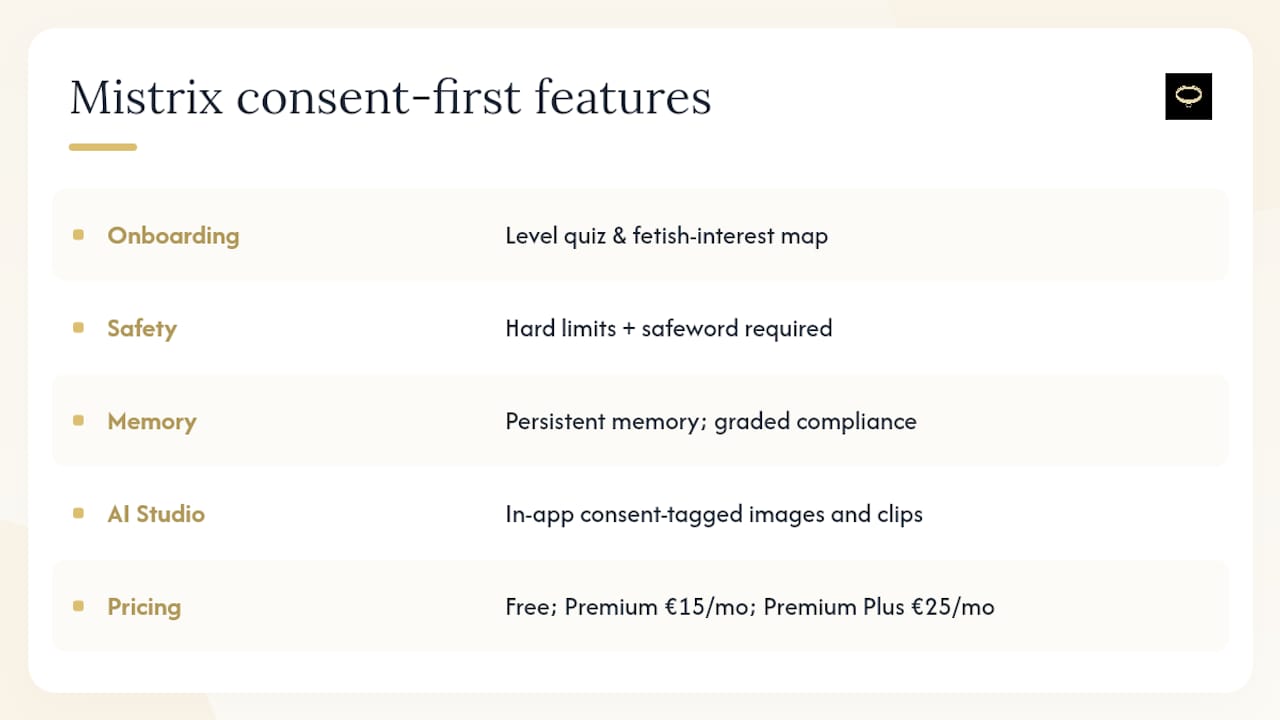
You can try the Free tier now and feel the onboarding flow firsthand, or move straight to Premium at 15 EUR per month or Premium Plus at 25 EUR per month for unlimited sessions, custom Domina creation, and full AI Studio access. Curious what kinks and dynamics the platform actually supports before you commit? The BDSM fetish guide breaks down the range from bondage to denial.
Sources
- Conversational phases in BDSM pre-scene negotiations
- Guest Blog: Responsible Use of Artificial Intelligence (AI) in Kink Communities - National Coalition for Sexual Freedom
- Who’s Your Daddy? A Chatbot
- A narrative review of BDSM/kink in technology-mediated sexual interactions
FAQ
Is AI Safe for Generating Femdom Scenes?
AI is safe when built on mandatory hard limits, a working safeword, and human review of every suggestion before you act on it. Mistrix enforces these as constraints on every generation rather than optional settings.
Can an AI Companion Replace a Human Partner?
No. AI roleplay works best as a rehearsal tool for practicing negotiation language and testing scene ideas, not as a substitute for human intimacy.
How Do I Stop a Scene Immediately?
Use your pre-agreed safeword or stop command. A well-built AI companion pairs semantic distress detection with an explicit command word that switches instantly to aftercare mode.
Is My Data Private When Using an AI BDSM App?
On platforms like Mistrix, sensitive data is encrypted client-side with a PIN only you control, so the server itself cannot read your session content.
What Does Mistrix Cost to Try?
Mistrix offers a Free tier to start, with Premium at 15 EUR per month and Premium Plus at 25 EUR per month for unlimited sessions and full AI Studio access, listed on the pricing page.