
Private use of adult apps is achievable, but only with a deliberate stack of tools, not a single toggle. The highest-impact moves are encrypting your messages with Signal, isolating your browsing in a separate profile or Tor, stripping metadata from any photo or video before upload with ExifTool, and routing traffic through a paid no-logs VPN. None of this makes illegal content legal, and every anonymity layer trades some convenience for protection.
TL;DR:
- Using a VPN first, followed by a separate browser profile and tracker blocker, greatly reduces casual tracking and IP leaks during adult app use.
- Stripping metadata from photos and videos before sharing prevents location and device information from being exposed through embedded data.
- Reading privacy policies thoroughly for data retention, encryption methods, and data deletion options helps determine how much control you truly have over your information.
- Connecting devices and apps often gather more data than expected, with risks including session recording or keystroke logging that are unaffected by network privacy tools.
- Immediate actions after a data breach, such as changing passwords and reporting incidents to authorities, are critical for limiting damage and protecting personal privacy.
Table of Contents
- What Are the Essential Privacy Tools for Adult App Users?
- How Do You Configure iOS and Android for Safer Adult App Use?
- What Risks Come from App-Connected Devices and Hidden Tracking?
- What Does a Layered Anonymity Stack Look Like?
- How Do You Read an Adult App’s Privacy Policy Before Signing Up?
- How Does Mistrix Approach Consent and Privacy by Design?
- How Do You Securely Delete or Deactivate an Adult App Account?
- What Are the Privacy Risks of Location Sharing in Adult Apps?
- What Legal Rights Do You Have Around Privacy in Adult Apps?
- Who Do You Contact After a Privacy Breach or Data Leak in an Adult App?
- What Tools Can You Use to Verify an App’s Privacy Claims Yourself?
- Protecting Yourself Starts With the App You Choose
- Sources
- FAQ
What Are the Essential Privacy Tools for Adult App Users?
You don’t need a security degree to close most of the gaps that leak your identity. You need the right handful of tools, installed correctly, and an honest sense of what each one does and doesn’t cover.
Signal handles the conversation layer. Its end-to-end encryption means messages are unreadable to anyone but you and the recipient, including Signal itself, which is why it’s the standard recommendation for any sensitive exchange, whether that’s coordinating with a partner or sending a verification photo. Use it instead of SMS or mainstream chat apps whenever the conversation touches anything you wouldn’t want stored on a server somewhere.
Tor Browser handles the anonymity layer, but it’s not a drop-in replacement for a VPN. Tor routes your traffic through multiple volunteer-run relays, which makes tracing your identity far harder, but it also slows page loads and gets blocked or challenged by a fair number of sites. A VPN is faster and better for everyday use; Tor is worth the friction when you specifically need to sever the link between your identity and your traffic.
ExifTool (or a mobile metadata-stripper app if you’re not comfortable with command-line tools) handles the media layer. Photos and videos carry embedded EXIF data, including GPS coordinates, device model, and timestamps, and stripping it before you upload or send anything is one of the cheapest privacy wins available.
Password managers and authenticators handle account security. A manager generates and stores a unique password per account, and pairing it with two-factor authentication through an authenticator app closes the door on the credential-stuffing attacks that hit reused passwords hardest.
Tracker blockers like Ghostery or uBlock Origin cut down on third-party scripts and reduce browser fingerprinting. They’re genuinely useful, but they only stop client-side tracking. Ghostery’s own guidance is clear that these tools can’t touch server-side analytics or first-party logging happening on the platform’s backend.
A paid, no-logs VPN hides your browsing from your internet service provider and masks your IP address from the sites you visit. Free VPNs often monetize your data instead of protecting it, so this is one category worth paying for.
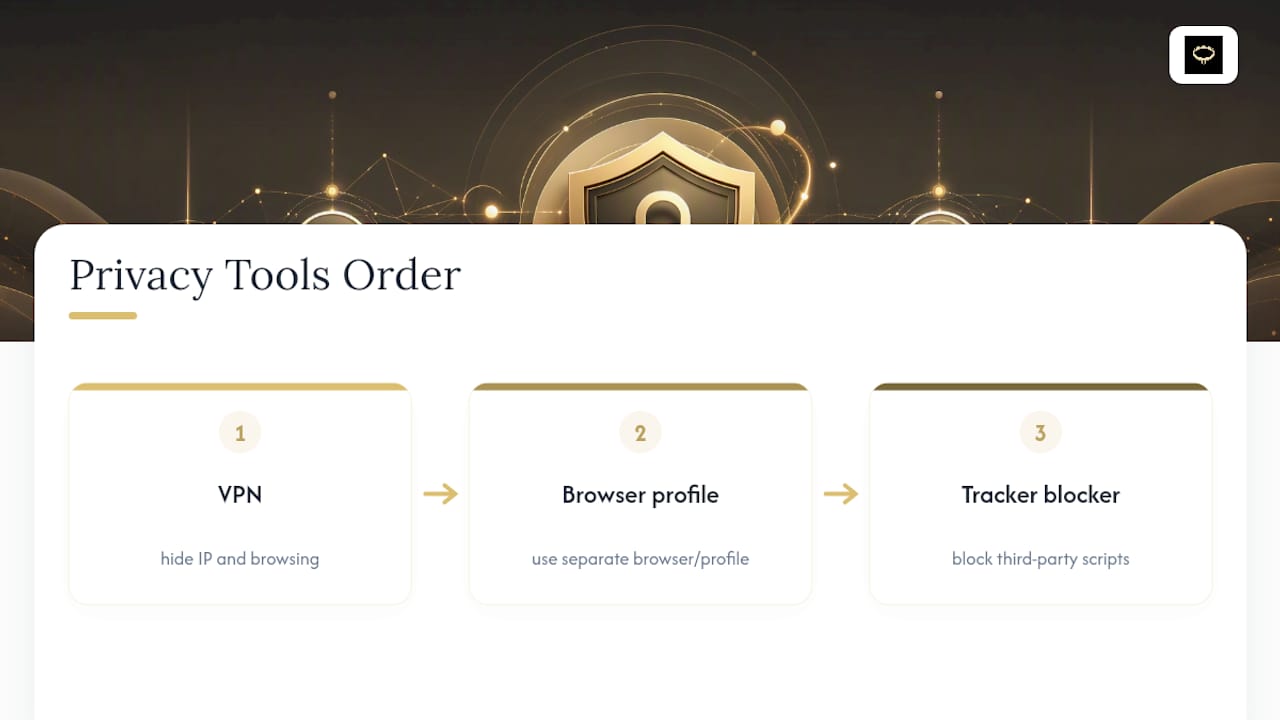
Pro Tip: Layer these tools in this order: VPN first, then browser profile, then tracker blocker. If you install a blocker before your VPN is active, some tracking domains have already logged your real IP before the blocker ever loads.
How Do You Configure iOS and Android for Safer Adult App Use?
Your phone’s default settings assume you want every app talking to every sensor. Adult apps are exactly the category where you want the opposite, and both platforms let you lock this down in a few minutes.
- On iOS, open Settings, then Privacy & Security, and review Location Services, Microphone, and Camera app by app. Set any adult app to “Never” for location unless a feature genuinely requires it, and do the same for microphone and camera access it doesn’t need.
- Decline “Learn from this App” for Siri Suggestions on sensitive apps, found under Siri & Search settings, so the app’s content doesn’t influence your search suggestions or Spotlight results.
- Turn off automatic iCloud backup for the app if your device supports per-app backup exclusion, or disable iCloud Backup entirely if you’re not comfortable with sensitive session data syncing to Apple’s servers unencrypted at the app level.
- On Android, go to Settings, then Apps, select the app, and open Permissions. Toggle off location, contacts, and microphone unless the app has a specific, necessary feature that needs them.
- Disable “Allow background data” for the app under its data usage settings if you don’t need real-time notifications, which also cuts down on background telemetry.
- Strip metadata from every photo or video before you share it, using ExifTool on desktop or a metadata-stripper app on mobile. This takes seconds and removes the GPS tag that could otherwise pin your exact location.
- Use a dedicated email address created specifically for adult app sign-ups, generate a unique password through your password manager, and enable authenticator-based two-factor authentication rather than SMS codes, which are vulnerable to SIM-swapping.
- Run adult browsing through a separate browser profile, keeping it isolated from your main profile’s cookies, saved logins, and autofill data. Treat private or incognito windows as one layer on top of this, not a substitute for it, and skip social logins entirely since they link the account straight back to your real identity.
What Risks Come from App-Connected Devices and Hidden Tracking?
Connected sex toys and companion apps often collect more than users expect: usage frequency, intensity settings, pairing logs, and sometimes location metadata tied to when and where a session happened. Kaspersky’s guidance on sex toy app privacy notes many of these apps request camera, contacts, and voice-assistant permissions that have nothing to do with their core function, and each one is an added exposure point.
The rarer but more serious risk is session recording or keystroke capture, where a script embedded in a page logs what you type or replays your entire session for later review.
An independent Blacklight audit of 95 adult sites found that most sites carried a manageable number of third-party trackers, but a small subset ran these invasive scripts. That’s the statistic worth remembering: rare, but high-impact, since a blocker or VPN does nothing once a script is already recording inside the page itself.
This is also why server-side tracking beats most consumer defenses. A VPN masks your IP, and a blocker stops third-party scripts, but neither one touches analytics running directly on the platform’s own servers.
Practical mitigations include:
- Use guest mode when a connected-device app offers it, so pairing and usage data aren’t tied to an account.
- Avoid pairing a device to an app at all if you only need manual control.
- Review and disable camera, contacts, and assistant permissions the app doesn’t strictly need.
- Favor apps that publish clear account deletion and data export processes.
What Does a Layered Anonymity Stack Look Like?
Anonymity is built in layers, and how many layers you add depends on your actual risk tolerance, not on chasing maximum protection by default.
A minimal stack covers the basics for someone mostly worried about casual exposure: a dedicated anonymous email address, a separate browser profile, and a tracker blocker like Ghostery. It’s fast, low-friction, and stops the most common forms of casual tracking.
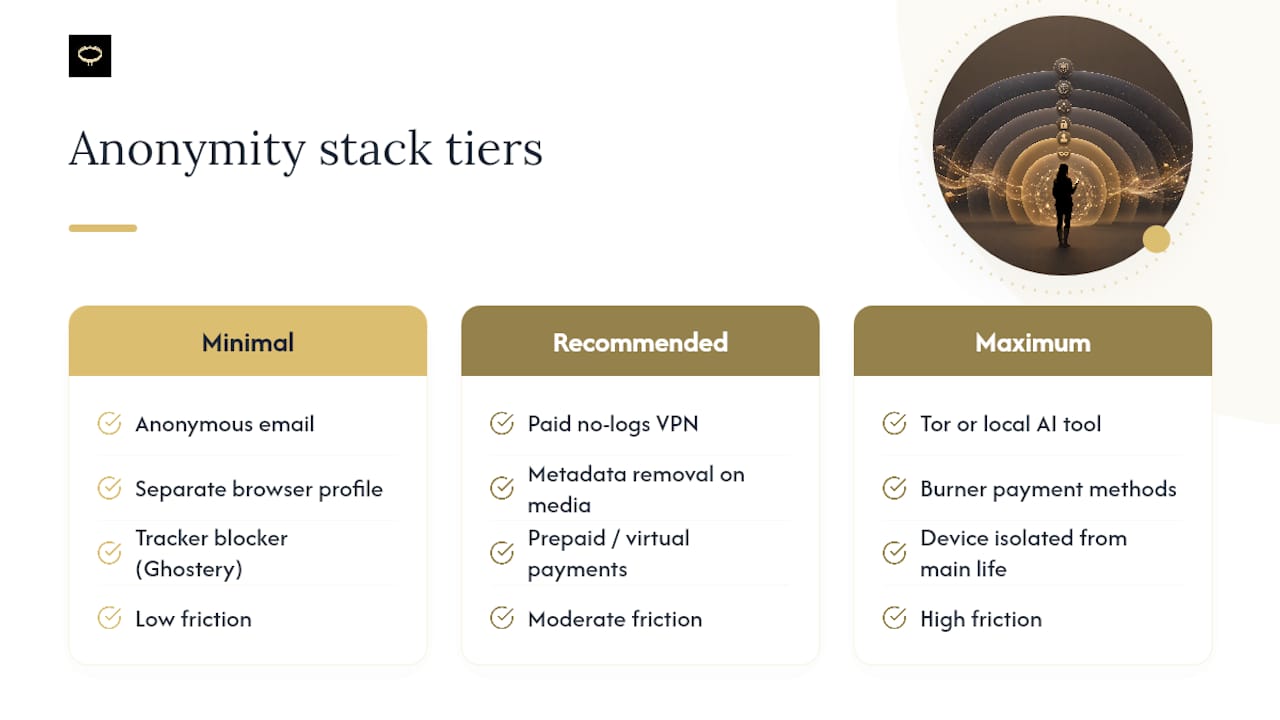
A recommended stack adds a paid no-logs VPN, metadata removal on every piece of media before it’s shared, and a virtual or prepaid payment option instead of a card tied directly to your name. This is the sweet spot for most users who take privacy seriously without needing to disappear entirely, and it lines up with the layered approach most practical anonymity guides recommend.
A maximum stack uses Tor or a locally-run AI generation tool instead of a cloud service, burner payment methods, and a device kept isolated from your main digital life entirely. It’s the slowest and least convenient option, and plenty of mainstream sites will flag or block Tor traffic outright, so expect friction in exchange for the strongest separation between your identity and your activity.
Pro Tip: Incognito or private browsing mode is not a stack on its own. It clears local history but does nothing to hide your IP, block trackers, or stop server-side logging, so treat it as one small piece layered on top of a VPN and a separate profile, never as your only protection.
No single tool in any tier is enough by itself, and stacking layers reduces risk rather than eliminating it.
How Do You Read an Adult App’s Privacy Policy Before Signing Up?
A privacy policy is a legal document written to protect the company, so reading it for what it doesn’t promise matters as much as what it does.
Start by searching for the retention period: how long does the app keep your data after you stop using it, and does it specify a deletion timeline for closed accounts? Then look for how encryption is described. “Encrypted in transit” only protects data while it’s moving between your device and the server; “encrypted at rest” protects stored data from a server breach; client-side encryption, where the company itself cannot read your content, is the strongest standard available.
Check the billing description too. Some apps outsource payment processing specifically to keep your bank statement discreet, which is worth confirming before you subscribe.
Before signing up, ask support directly: “Do you delete my data on account deletion?” “Do you use session replay or keystroke logging?” “Can I use the app in guest mode?” Vague language like “we may share data with partners,” no visible opt-out settings, and mandatory biometric data collection with no stated minimization are all red flags worth walking away from.
How Does Mistrix Approach Consent and Privacy by Design?
I’m David, and I’ve spent years watching adult platforms treat privacy as a marketing line rather than an architecture decision. Mistrix takes the opposite approach: sensitive user data is encrypted client-side with a user-held PIN that the server never receives, so the platform is structurally unable to read your personal content even if it wanted to.
The onboarding flow also builds consent in as a constraint, not an afterthought, with mandatory hard limits and a safe word set before any session begins. If you’re evaluating other apps in this space, look for the same markers:
- A stated guest mode or minimal-account option
- A visible, one-step account and data deletion flow
- No raw sensitive data stored unencrypted on company servers
- Privacy settings that are surfaced during onboarding, not buried in a menu
How Do You Securely Delete or Deactivate an Adult App Account?
Deactivation and deletion are not the same thing, and adult apps in particular blur that line more than most software categories. Deactivation typically hides your profile but keeps your data intact on the server, ready to reactivate later. Deletion is meant to remove your data permanently, but the word “meant” matters, because policies vary widely in how completely and quickly that actually happens.
Before you delete anything, export any data you want to keep, since most platforms don’t offer a recovery window once deletion is confirmed. Then go into the app’s account settings and look specifically for a “Delete Account” option rather than “Log Out” or “Deactivate,” which usually preserves your data by design.
If you don’t see a self-service deletion option, contact support directly and request full data deletion in writing, including any connected device pairing logs, uploaded media, and chat history. Ask for confirmation once it’s complete, and save that confirmation.
Cancel the subscription separately from deleting the account. These are two different systems on most platforms, and canceling billing doesn’t always trigger data deletion, just like deleting your account doesn’t always stop a recurring charge already in progress.
Finally, revoke any connected app permissions tied to that account, including third-party logins, connected payment methods, and paired devices, since those links can persist even after the core account is gone.
What Are the Privacy Risks of Location Sharing in Adult Apps?
Location data in an adult app carries a heavier consequence than it does in a weather app, because the mere fact of using the app is information you may not want tied to a place, a time, or a pattern of movement.
Many adult apps request location access for features you may not even use, like showing nearby matches or localized content, and once granted, that access often runs continuously in the background rather than only when the app is open. Over weeks of use, that builds a detailed movement history sitting on a company’s server.
On iOS, go to Settings, then Privacy & Security, then Location Services, and set the app to “Never” or “Ask Next Time” instead of “Always.” On Android, the equivalent path is Settings, then Apps, then Permissions, then Location, where you can restrict access to “Only while using the app” or deny it outright.
If a feature genuinely requires an approximate location, check whether the app offers a coarse or city-level location option instead of precise GPS. Some platforms support this distinction explicitly; others don’t, in which case denying location access entirely is the safer default.
Spoofing tools exist that report a false GPS location to apps, but they carry their own risk since many platforms flag or restrict accounts that detect location spoofing. A cleaner approach is simply denying location access and using a VPN to mask your general region at the network level instead.
What Legal Rights Do You Have Around Privacy in Adult Apps?
Privacy protections for adult app users vary significantly depending on where you live, and no single federal law in the United States governs adult app data the way, say, health data is governed under HIPAA. Instead, protection comes from a patchwork of state privacy laws, contract terms in the app’s own privacy policy, and general consumer protection rules that apply if a company breaks its own stated promises.
If you live in a state with a comprehensive privacy law, such as California, you typically have a legal right to request a copy of the data a company holds on you, request its deletion, and opt out of having it sold to third parties. These rights apply to adult apps the same way they apply to any other consumer software collecting personal data, though enforcement depends on the company actually complying.
At the federal level, the Federal Trade Commission has brought enforcement actions against companies that misrepresent their data practices, meaning a company that promises confidentiality in its marketing but shares data behind the scenes can face real legal consequences for that mismatch.
Your practical leverage as a user is the privacy policy itself. It functions as a contract, and a documented violation of its own stated terms, like ignoring a deletion request or sharing data it promised not to, gives you standing to file a complaint with your state attorney general’s office or the FTC.
Who Do You Contact After a Privacy Breach or Data Leak in an Adult App?
The first hour after learning about a breach matters more than any other, because the actions you take immediately limit how far the damage spreads.
Start by changing your password on the affected account and on any other account where you reused that password, since credential reuse is exactly what turns one breach into several. Enable two-factor authentication on the account if it isn’t already active, and revoke any active sessions or connected devices from the account’s security settings.
Check whether the breach involved payment information specifically. If it did, contact your card issuer to flag the account and request a replacement card rather than waiting to see if fraudulent charges appear.
Report the breach to the app’s support team in writing and ask for their official incident disclosure, which most companies are legally required to provide once a breach involving personal data is confirmed. If the company is unresponsive or the breach involved a significant volume of personal data, file a complaint with the FTC through its consumer complaint portal, and check whether your state attorney general’s office has a separate reporting channel, since several states require companies to notify affected residents directly.
Finally, monitor your email and financial accounts for weeks afterward, not just days, since leaked data sometimes surfaces on breach-monitoring services or gets used in follow-up phishing attempts well after the initial incident fades from the news.
What Tools Can You Use to Verify an App’s Privacy Claims Yourself?
You don’t have to take a platform’s word for its own privacy practices. The Markup’s Blacklight scanner checks any site for trackers, session recording scripts, and keystroke capture in seconds. VirusTotal scans a URL against dozens of security engines to flag malware or phishing risks before you visit it. For the tools themselves, install Signal and Tor Browser directly from their official Signal and official Tor Project pages rather than third-party app stores, and consult Kaspersky’s guidance whenever you’re evaluating a connected device’s app permissions.
Protecting Yourself Starts With the App You Choose
Every tool covered here reduces risk, but the platform you choose in the first place sets the ceiling on how private your experience can actually be. Some privacy-focused companion apps implement client-side encryption with user-held PINs, enforce consent through mandatory hard limits before sessions, and design the experience for discretion from onboarding onward. If you’re exploring what a privacy-first companion app looks like in practice, the Mistrix platform is a reasonable starting point for comparing your options against the checklist in this guide.
Sources
- Kaspersky: Sex toy app privacy and security guide
- I audited 95 adult sites for privacy using The Markup’s Blacklight, here’s the data
- Signal
- Tor Project
FAQ
Is There an Adult-Only Social Network With Real Privacy Protections?
Several platforms market themselves as adult-only social spaces, but privacy protection depends on their specific encryption and data retention practices, not the adult label itself, so check each platform’s policy individually before assuming it’s private.
What Apps Allow Adult Content Without Compromising Privacy?
Apps that allow adult content vary enormously in their privacy design, and the safest choices are ones offering client-side encryption, clear deletion policies, and guest mode, rather than any specific app category as a whole.
What Is the Most Widely Used App Among Adults for This Kind of Content?
Usage patterns shift constantly and specific figures aren’t reliably tracked publicly, but the more useful question is which apps demonstrate strong privacy practices like end-to-end encryption and transparent data retention, regardless of how many people use them.
Which Browser Is Best for Blocking Adult Content?
Most major browsers, including Chrome, Safari, and Firefox, support built-in or extension-based content filtering through parental controls or restricted mode settings, and pairing that with a tracker blocker like Ghostery adds a second layer of control.